What Is Business Process Automation and How to Define What to Automate First
Quick Summary
- Tooling before definition is the most common failure mode. Most automation initiatives that collapse share the same root cause: the tool was chosen before the problem was understood. Defining the process and its expected outputs first is what determines whether an initiative will actually work.
- A process is only automatable when its output is predictable. When the same input consistently produces the same output, automation handles it cleanly, without fatigue, variation, or the need for human intervention at each handoff. When outputs legitimately vary based on context or judgment, automating the core will either produce consistent errors or create a maintenance burden of conditional rules that eventually breaks the system.
- Three diagnostic questions filter automation candidates before any tool decision. Output consistency, input predictability, and failure cost each need a clear answer before scoping begins. A process that fails any of the three needs redesign first, not a tool that compensates for the gap.
- Compliance checks, content workflows, and data pipelines are the strongest first candidates. These categories share the characteristics that make automation appropriate: discrete states, encodable business logic, and a fixed correct answer for each input. High-volume, rule-based checks return value quickly because errors have compounding consequences and the logic does not require interpretation.
- Implementation follows a four-phase sequence that should not be collapsed. Process definition and mapping, system integration planning, configuration and testing, and deployment with monitoring each serve a distinct function. Skipping phases reintroduces exactly the risks the diagnostic work was designed to prevent.
- AI earns its place at the layer automation cannot handle. When a process involves variable inputs, judgment calls, or unstructured data, rule-based automation hits a ceiling. AI handles what automation cannot, including variable intake normalization and interpretation, while the deterministic base layer handles what requires consistency, auditability, and cost efficiency. The two layers serve different functions and are not interchangeable.
Before any workflow gets mapped and before any tool gets selected, teams often skip a question that determines whether an automation initiative will work or fail: does this process actually do the same thing every time it runs?
Enterprise teams we work with tend to arrive at automation in one of two ways.
Either a mandate comes from leadership, and they need a starting point, or a previous initiative collapsed, and they are rebuilding.
In both cases, the root cause of what went wrong tends to be the same: the tooling got picked before the problem was understood.
And in a growing number of engagements, the tool of choice has been AI, whether the problem called for it or not.
This article lays out what business process automation actually is, which processes are worth automating first, and the diagnostic questions our team asks before a single line of code gets written.
What is Process Automation?
Process automation is the replacement of manual, rule-based work with software that executes the same steps consistently and without human intervention at each handoff.
When a task has a fixed correct answer that does not change given the same input, automation handles it the same way every time, without fatigue, without variation, and with a full audit trail.
Business process automation specifically refers to multi-step workflows that cross system boundaries and involve business logic: routing, approvals, validation, status triggers, and data handoffs between platforms.
This is distinct from simple task automation, which handles a single repeated action in isolation, and from digital process automation, a broader architectural pattern that orchestrates automation across an entire organization’s technology stack.
The distinction matters because the scoping decision changes depending on which layer is involved.
A single recurring task is a candidate for a script or a trigger. A workflow that crosses four systems, involves approval routing, and needs an audit trail for compliance is a business process automation project.
Treating them the same way produces over-engineered solutions for simple problems or under-built solutions for complex ones.
What all three levels share is the foundational condition: the output needs to be predictable.
Automation follows rules. You define the condition, the action, and it runs the same way every time. That predictability is both its strength and its ceiling.
Why Business Process Automation Matters and Why Implementations Fail
The case for automating business processes is concrete.
Repetitive manual work consumes organizational capacity that could go toward higher-value activity. Handoffs between systems create delays, errors compound across steps, and teams that depend on manual execution cannot scale without adding headcount.
The returns, when automation is applied to the right processes, are equally concrete: consistent execution, reduced error rates, full auditability, and freed capacity for work that actually requires judgment.
Likewise, the failure picture is just as clear. Automation projects at the enterprise level have a well-documented history of falling short of their original objectives.
Gartner’s data on AI specifically reports that only 48% of AI projects reach production, with an average of eight months from prototype to deployment for those that do.
The root cause behind these numbers is nearly always the same: teams automate before they define.
RAND Corporation research identifies failure to align projects with actual business needs as one of the five consistent causes across AI and automation failures. A broken process automated produces broken output faster. A poorly scoped workflow handed off to a tool does not become well-scoped because a tool is running it.
There is a second, more recent failure mode. Teams reach for AI when a deterministic workflow would have been sufficient, because there is organizational pressure to demonstrate AI adoption.
The process would have been handled cleanly by a straightforward automation layer, but the request arrived as an AI project, and that is what got built.
The antidote to both failure modes is the same: define the process and its expected outputs before choosing any tool. The sections that follow are the framework our team uses to do that.
Core Business Processes Worth Automating First
Not all inefficient processes are automation candidates. The strongest candidates share three characteristics: the output is consistent given the same input, the inputs arrive in a predictable format, and the volume or error cost justifies the build.
Three categories surface reliably in enterprise environments where automation delivers returns.
1. Compliance and Quality Checks
Structured, rule-based, high-volume checks are among the strongest automation candidates in any technical organization.
Color contrast validation, HTML attribute checks, structured data validation, security header audits, and accessibility compliance checks at the element level all share the same characteristic: there is a fixed correct answer for each input. A tag either has the required attributes or it does not. Contrast either passes the threshold or it does not. These checks run identically every time, produce auditable results, and do not require interpretation.
If you want a concrete example of deterministic checks done well, our web accessibility audit approach and metrics shows how we structure validation and reporting beyond basic pass/fail.
2. Content Operations and Publishing Workflows
Approval routing, status-based publishing triggers, handoffs between editorial and development teams, and notification logic based on content state changes are strong candidates for workflow automation.
The business logic is encodable, the states are discrete, and the outputs are consistent. A piece of content either meets the conditions for publication or it does not. The workflow can enforce that without human intervention at each step.
3. Data Processing Pipelines
When data arrives in a known format from a known source and needs to move into a structured destination, automation handles it cleanly.
Invoice processing from a standardized format, structured form submissions into a CRM, compliance report generation from fixed data sources: the transformation rules do not change based on context or meaning. They run the same way every run.

How To Identify High-Impact Processes for Automation
Choosing which workflows to automate requires structured analysis, not intuition.
Our team evaluates candidates against three axes before any tool decision is made: output consistency, input predictability, and failure cost. A process that passes all three is a strong candidate. A process that fails any of them needs redesign before automation.
Output Consistency
The first question is whether the process needs to produce the same result every time given the same input.
If the answer is yes, automation is appropriate at the core. If the output legitimately varies based on context, meaning, or judgment, automation at the core will either produce the wrong answer consistently or require so many conditional rules that the system becomes unmaintainable.
That is a signal to either redesign the process for consistency or route the judgment-dependent steps to an AI layer.
Input Predictability
The second question is where the data comes from and how consistent its shape is. If the data always arrives in the same format, normalized and from a known source, automation fits.
If the data arrives from multiple sources in variable formats, or if the structure changes depending on who submitted it, the intake layer needs to be addressed first.
AI can normalize variable inputs into a standard structure, but that is a different architectural decision than building the core process on AI.
Accessibility auditing is a good illustration of this split: we use AI for speed while keeping deterministic criteria intact in AI-accelerated web accessibility auditing.
Failure Cost
The third question is what happens when it gets it wrong.
For high-compliance, high-volume processes where errors have regulatory or revenue consequences, the argument for deterministic automation is strongest.
For processes where occasional errors are low-cost and easily corrected, the calculus changes. The failure cost also determines how much exception handling needs to be designed upfront.
Accessibility is one of the most common compliance-heavy domains where deterministic checks and audit trails matter, which is why we treat web accessibility as an engineering system.
A Four-Step Framework for Automating Business Processes
Once the diagnostic questions have been answered and the right processes identified, implementation follows a structured sequence. Skipping phases or collapsing them reintroduces the risks the diagnostic work was designed to prevent.
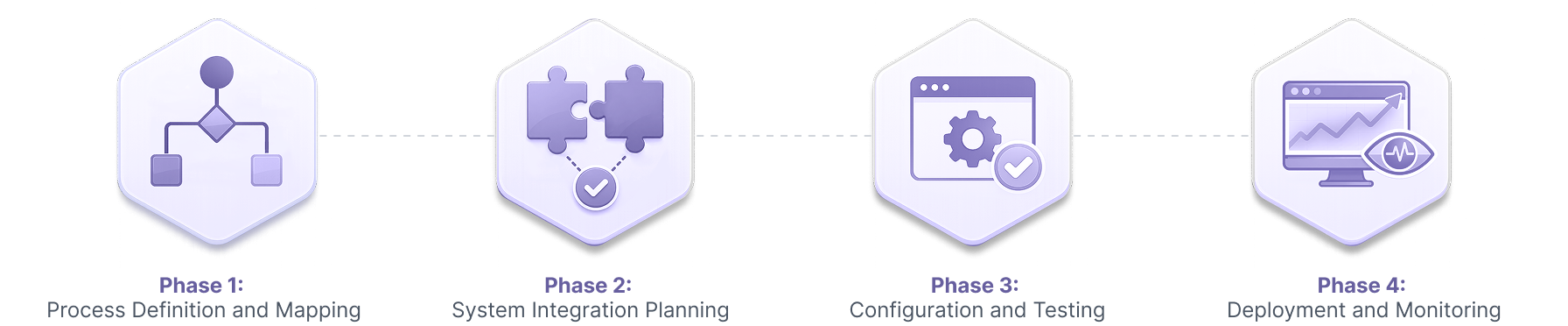
Phase 1: Process Definition and Mapping
Document the current workflow step-by-step using actual examples, not the way the team believes it works. Identify every system involved, every data handoff, and every decision point. Define what the correct output looks like and specify which exception conditions should trigger escalation rather than automated execution.
This documentation is the foundation everything else is built on. Automating an undocumented process is automating assumptions.
Phase 2: System Integration Planning
Audit the existing tools to understand what data is available and what integration capability each system exposes. Identify the gaps where manual data re-entry currently occurs between systems. Determine whether native connectors exist or whether middleware is required. Define data validation rules for each integration point. Plan exception handling for cases that cannot be automated completely before any configuration begins.
Phase 3: Configuration and Testing
Configure workflows using actual business data and real scenarios, not synthetic test cases. Run parallel testing where the automation and the manual process run simultaneously on the same inputs. Identify and resolve edge cases before full deployment. Validate that outputs are accurate and complete across the full range of expected inputs, including the edge cases mapped in Phase 1.
This kind of validation is easier to sustain when your test layer is solid, which is why we documented our Playwright vs Cypress experience with automation testing frameworks.
Phase 4: Deployment and Monitoring
Begin with limited scope to surface issues before they affect full volume. Define the success metrics before deployment so there is a baseline to measure against. Monitor performance against those metrics continuously. Establish clear escalation paths for exceptions. Adjust logic based on observed performance, not assumptions.
How To Avoid Common Challenges in Business Process Automation
These failure modes surface across enterprise automation implementations. Each has a concrete signal and a correct architectural response.
- Automating before the process is defined: The process seems to work in practice, but nobody has documented the decision rules, exception conditions, or expected outputs. Automation runs and produces consistent output, with assumptions, not with the actual business requirement. The fix is documentation before configuration, not after.
- No exception handling design: The automation works for the standard case but fails silently on edge cases. Nobody catches the failures because the system records nothing. The fix is designing the escalation path in Phase 1, before the standard path is built.
- Confusing activity with productivity: The system is running, outputs are being produced, and the dashboard shows volume. But nobody has measured whether the outputs are correct or whether the underlying problem is actually being solved. The fix is a measurement baseline defined before deployment, not afterward.
- Shipping prototypes as production systems: The first functional version gets deployed before anyone has explicitly decided it is production-ready. Edge cases accumulate, technical debt compounds, and the cost of fixing the system in production is a multiple of what it would have cost to design it correctly. The fix is treating the prototype/production distinction as an explicit architectural decision. When the risk is prototypes quietly becoming production, a dedicated quality assurance QA layer is often what keeps edge cases from turning into operational debt.
When AI Belongs in a Business Process Automation Pipeline
Automation has a ceiling. When a process involves variable inputs, judgment calls, or unstructured data that rule-based logic cannot encode, automation hits that ceiling and produces either errors or a maintenance burden of conditional rules that grows until the system collapses under its own complexity.
That is where AI earns its place in the pipeline. Not as a replacement for the deterministic base layer, but as the layer that handles what automation cannot.
We get a lot of requests that say “I need to build something using AI.” But we need to understand to what extent they mean that. Maybe we can put automation at the core for stability, cost efficiency, and auditability, and add AI only for interpretation or presentation. The two layers are not interchangeable.
AI and automation used together, with each at the layer it is suited for, is what produces pipelines that are both capable and sustainable.
For the full decision framework on how to make that call, see our article on AI vs. automation and how we choose the right layer for each problem.
Ready To Start Automating Your Business Processes?
The framework in this article is what we run through with every engagement before recommending a tool or an architecture.
If you are trying to figure out which of your processes are genuinely ready to automate, which need to be redesigned first, and where AI might earn its place in the pipeline, that conversation is where we start.
Our team has built these systems in enterprise environments and can help you identify the right layer for each part of your specific workflow.
Frequently Asked Questions
Process automation is the use of software to execute repetitive, rule-based steps in a workflow without human intervention at each stage. The defining characteristic is determinism: given the same input, the process produces the same output every time. Business process automation extends this to multi-step workflows that cross system boundaries and involve business logic such as approvals, routing, and data validation.

About the author
Related posts
What Is Business Process Automation and How to Define What to Automate First
By David Cespedes, June 16, 2026Business process automation works when you define the right processes first. We discuss how to identify automation candidates and avoid the most common failure modes from our enterprise experience.
WordPress vs Drupal vs Contentful in 2026: What We've Learned Implementing All Three
By Omar Aguirre, June 5, 2026A side-by-side comparison of WordPress, Drupal, and Contentful across architecture, editorial experience, AI integration, security, cost, and headless capabilities. Written by a team that implements all three.
Take your project to the next level!
Let us bring innovation and success to your project with the latest technologies.